Monday, February 24, 2025

WordMath and antivirus problems

For some time, WordMath has been flagged as malware by various antivirus programs. This is a false positive, meaning the antivirus software incorrectly identifies WordMath as malicious.

The program download may also be blocked by browsers like Chrome.

What causes this problem?

The exact cause is unknown, but antivirus programs scan files using AI, sandboxes, and heuristic analysis. One of these scans likely triggers a malware alert. This is probably because VBA add-ons, like WordMath, are essentially programs embedded in Word documents. Since VBA add-ons can be exploited to distribute malware, antivirus programs tend to be highly sensitive to this type of software and may flag code patterns or techniques commonly associated with malicious behavior.

WordMath is a complex program that employs various methods, some of which can also be used for malicious purposes, such as:

  • Calling external programs (e.g., running Maxima on Mac)

  • Opening web links in a browser (e.g., for updates)

  • Downloading files from the internet (e.g., checking for updates, downloading GeoGebra)

  • Custom message boxes (which could be mistaken for impersonation attempts)

  • Custom webview browsers (for executing CAS GeoGebra)

  • Communication with external custom API DLLs (for Maxima communication)

Multiple attempts have been made to adjust code methods and techniques, but these changes have had little impact on antivirus detection.

The increasing number of global cyberattacks likely explains why antivirus programs are becoming more aggressive in their detection mechanisms.

Interestingly, not all versions of WordMath are affected, despite sharing nearly identical code. However, all recent versions are consistently blocked.

What can you do?

You have two options:

  1. Manually allow WordMath to run:

    • Exempt the file from antivirus scans. Every antivirus program and browser has a way to do this, but the exemption must be manually configured on each machine.

    • If the download is blocked, try an alternative browser. For example, Microsoft Edge typically does not block the download.

  2. Sign up for a Partnership:

    • Partnership with Eduap grant your school or organization access to code-signed files. Code signing increases trust with most antivirus programs and reduces the likelihood of false positives. While not foolproof, care is taken to ensure Microsoft Defender allows the software to run.

Wednesday, August 2, 2023

WordMat v. 1.26 released

This version release solves many of the issues reported on Github issues.

No changes has been made to the Maxima CAS engine in this release. That is a very cumbersome task, which also risks introducing new errors, and which will make antivirus programs report WordMat as a virus (false positive) for a few months. It is hoped this release will be stable and not cause many issues in updating. (no promises 😬)

List of changes:
  • GeoGebra updated
  • Differential equation solver now has button to numerically solve the differential equation
  • Support for f'(x)=... notation in differential equations
  • Numerical solver for differential equations: improved and bugs resolved.
  • Complete support for piecewise-defined functions in calculations and graphplotting with GnuPlot or GeoGebra
  • Problems with Formulae in the menu resolved
  • Formulae for confidence interval added to binomial menu
  • Excel sheet 'Statistik': columns expanded to show more digits
  • Excel sheet 'Simulering' has a new binomial example
  • New shortcut overview
  • MikTex support fixed (still in Beta)
  • Support for another way of entering vectors in Word.
  • Solved problem with vector calculations using GeoGebra
  • Several minor bug fixes

Thanks to all the people who reported issues on Github.
If you find an issue please report in on Github. It can take a long time before the issue is resolved, but there is hope this will improve thanks to the Partnership program

Wednesday, April 13, 2022

WordMat v. 1.24

This is a major release with a number of new featues, focusing on a stronger interaction with GeoGebra

News in this version:

  • Alternate CAS engine: GeoGebra
  • Maxima version aligned and updated to 5.45.1 for Windows and both Mac-versions
  • New Plotting option: 'GeoGebra Browser'
    • Much faster than GeoGebra 5
    • Still runs offline and does not require internet access 
  • GnuPlot removed from the Mac version. It never really worked well on Mac. The new 'GeoGebra browser' plotting option replaces it.
  • Simultaneous equation solving now works on Mac-M1
  • Volume of revolution now works on Mac with GeoGebra
  • 3D plot now works on Mac
  • Numeric differential equation solver now works on Mac
  • Convertion to GeoGebra syntax now also works for vectors and matrices (dot product, has to be applied using dot(u,v), not by using a dot-operator)
  • Latex template now works on Mac
  • Many minor bug fixes

GeoGebra Browser plotting option

WordMat now ships with 'GeoGebra-math-app-bundle' which is used for the 'GeoGebra Browser' plotting option. It is easy to insert a screenshot of the plot:
  • From the GeoGebra menu choose 'Export image' and 'copy to clipboard'. Finally paste into Word.
  • On Windows GeoGebra will open in Edge.
    Click 'ctrl+chift +s' to take a screenshot and choose from 'Capture area' or 'Capture full page'
  • On Mac GeoGebra will open in Safari.
    Click Shift+Command+4 to capture a selected portion of a screen.

GeoGebra for CAS

The 'GeoGebra-math-app-bundle' is also used as an alternative/backup CAS engine. In the settings menu on the CAS-tab, you can now choose between

  1. Maxima
  2. GeoGebra
  3. GeoGebra broweser

If you do any calculation or solve an equation, the chosen CAS engine will be applied.
An alternative CAS engine has a couple of obvious benefits:

  • If one engine fails to solve a particular problem, you might have better luck trying the alternative. 
  • Maxima has been shown to be very vulnerable to changes in updates to MacOS. Now there is a backup. 

GeoGebra CAS option

With this option WordMat operates just as with Maxima. The result is written directly in Word. The user will in most cases not see any difference.
The input syntax in Word is basically the same for both engines, but there are some differences.

Generally Maxima is a stronger CAS tool, and more consistent. It also has a larger library of functions to draw from. However GeoGebra also has functions which are better than Maxima's. GeoGebra is also faster.

Key points to be aware of:

  • Be careful when using variables of more than one letter, when using GeoGebra. ab can be interpreted as a*b or the variabel ab, depending on the circumstances. 


  Note on GeoGebra CAS on Mac

On Mac GeoGebra runs in a tab in safari, which is automatically opened. WordMat can then send and receive commands in the background.
Unfortunately it requires a special setting in Safari to allow 3rd party programs to send commands to Safari.

  1. Open Safari settings
  2. Click advanced
  3. At the bottom click 'show developer menu'
  4. Open the newly available Safari developer menu
  5. Click 'Allow javascript from Apple events' (near the bottom of the list)
  6. When doing the first calculation with WordMat you will be prompted to allow it.

Make sure not to allow javascript communication from other programs you don't trust.

GeoGebra browser CAS option
Will open GeoGebra in a browser and show the answer to a calculation, equation solving etc.. Definitions are applied just as in the Maxima case. The syntax is converted to GeoGebra syntax. trig functions are applied according to the radian setting in WordMat. Just as the 'GeoGebra browser' plotting option, you can then copy the result to Word.

It is important to stress that WordMat does not communicate via internet when using the GeoGebra options, even though it works via a browser. All required files are installed and run on the local computer.


Thursday, November 4, 2021

WordMat for Mac M1 released

This is the first release that support the 'new' Mac M1 processor.

A number of problems had to be overcome to create this release. The main problem was that the Math engine 'Maxima' did not run on M1-processor with the rosetta emulator.

  1. First the compiler for SBCL that compiles Maxima had to be created for Maxima. 

  2. Maxima for WordMat was running an older version of Maxima, because the deployment system for newer systems changed to Macports. Eventually I could use Macports to get a compiled version of Maxima for M1. The installer had to rewritten from scratch.

  3. WordMat does not run a standard version of Maxima, but included a lot of additional code. This code had to be updated to match the new Maxima version.

  4. The c-library to communicate between Maxima and Windows was easily compiled for M1, but I simply could not make it work with the new version of Maxima, after many, many attempts. Eventually a new method for communication was developed. The new method starts a new instance of Maxima for each calculation. This makes WordMat a bit slower, but not much as the M1-processor is pretty fast. Coming from a 2 year old computer you will not notice it. 

The new method has a couple of advantages that should make WordMat more stable for Mac:

  • A fresh version of Maxima for every calculation means previous calculation cannot interfere
  • The new method has a default timeout of about 15s. If Maxima does not finish, the process will be killed. On previous versions this could halt Word.


Thursday, April 20, 2017

WordMat v. 1.12 released

This release mainly fixes bugs from the previous major release, such as problems with logarithms and using exact mode on the Mac version, but also several other minor bugs.

This version introduces one new feature: An updated Excel sheets to easily do regression and plot residuals. It can be a tool for both mathematics and science subjects to make graphing in Excel easier and better looking.
You open the Excel sheet from the regressions menu or the Graph menu.

The screenshot below shows some of the features

  • Enter up to 3 datasets which shows up as points in different colors
  • Perform 'on the fly' regression, quickly testing the match of different regression types
  • Residual plot to better analyze the regression fit
  • Manually enter any function (here the black dashed linje 2x+3)
    You can enter a function using constants which then can be manipulated in the constants column for a precise fit.
  • Highlight any point (the red dashed line)


Tuesday, March 14, 2017

Backspace crash problem resolved

For years there has been a bug in Word which would crash Word on certain occasions, if you pressed backspace in an equation.
Microsoft has now resolved the problem - all you need to do is update Office 365. It must be at least build 7070. (Files | Account | Office updates)

Sunday, February 19, 2017

WordMat for Mac - Word 2016 released

Finally you can download the new version for Mac for Word 2016.
The code behind the Windows and Mac version is now from the same code base and hence the version numbers will be the same for Windows and Mac. It is planned that future releases for Windows and Mac will happen simultaneously. The current version is called v. 1.11

Also with this version WordMat is now 100% translated into english, and partially to spanish. The code has been prepared for translation into other languages. If you wish to contribute by translating WordMat completely or partially into your native language - send me an email.

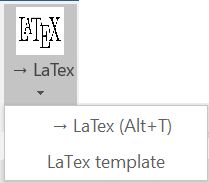
This version also brings a popular function to the front of the menu. You can open a LaTex template from the WordMat menu and start creating LaTex documents using Word.

Get the new version here: www.eduap.com

Saturday, January 28, 2017

Microsoft Forms now support Math

My School adopted SharePoint/o365 as a learning platform 1½ ago. Since then I have become a big fan of OneNote and more recently Microsoft Forms.
I have used Microsoft Forms to create:
  • Quick surveys
  • Polls
  • Gather information from a group of people
  • School wide evaluations 
  • In class quizzes embedded in OneNote.
What I like about Forms is that it is extremely fast and intuitive. You can literally create and deploy a survey in less than a minute. At a first glance it can seem like a very simple survey application, but there are some powerful features hidden beneath the hood.
A few days ago Microsoft launched Math support for Forms, at the Bett conference in London. As a math teacher this is very exciting. I have developed a lot of math quizzes using Moodle, which is a very powerful quiz-tool especially when it comes to math support. Unfortunately development of quizzes for Moodle is not for everyone. It requires a lot of training and it can be a tedious time consuming proces. I'm hoping that Forms can be my new best friend when it comes to creating tests and quizzes for formative feedback, as time is scarce.
My initial test shows the following main features of math support in Forms:
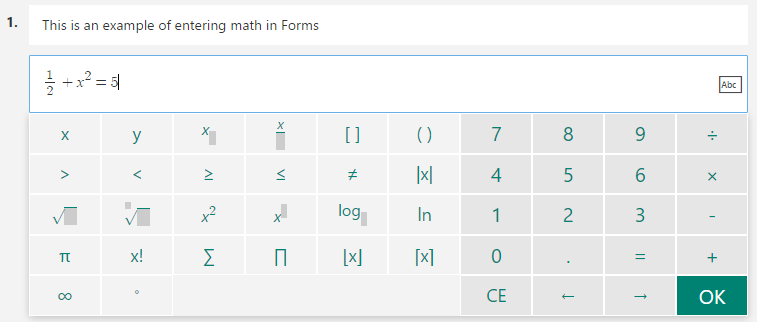
  • Type math using on screen template, keyboard shortcuts or Latex for complete control (You can use WordMat to create any math output using the 'convert to Latex' function - alt+t )
  • Auto suggestion of correct answers to your math input  (Yes - and quite powerful!)

The results of quizzes can be graded automatically or manually. Multiple choice questions are graded automatically, whereas text or number input must be graded manually. Hopefully an option for automatic grading of text and number will soon be available. The manual grading feature is quite clever though, you can choose to grade all of the answers to a specific question on one page.
This is a link to a sample Forms quiz using math

Also check out my video demonstrating Math support in Forms:

If you are using OneNote class notebook, deploying the form is as simple as pasting the Forms link on any page. It will then automatically be embedded within that page. You can create forms which only your school students can access, or open anonymous forms which anyone can answer.
It is also very easy to share a Form you have created. You can create a link, which any teacher can use to get a copy of your form(Without the responses😉), or you can create a link to collaborate on a form with your colleagues.

Forms is a new application and still a work in progress. It is going to be exciting to see what new functionality the future will bring. The speed of the development has been quite fast thus far.

Forms is only available for schools with an Office 365 Educaton plan - which comes free of charge.

Friday, January 27, 2017

WordMat for Mac for Word 2016 in development

When the initial release of Word 2016 for Mac was released I was unable to convert WordMat for Word 2011 to the new version.
Since then Word 2016 has been significantly improved in terms of stability and features, and more importantly Microsoft has supplied contacts and documentation from the Office devolpment team in Redmond. This has removed all obstacles, and the development is now entering the final phases. Currently a prototype is being tested at my school.


The new version will be more similar to the Windows version than the Word 2011 version was. It will have exactly the same ribbon, and installation will be smooth - requiring no manual steps.

 Expected release is date 1. march 2017.


Sunday, September 21, 2014

Creating LaTex like documents using WordMat

From version 1.07 it is possible to create LaTex documents using WordMat.
The document will have the same setup and fonts as used in LaTex-documents. The output will not be exactly identical to what you can accomplish using LaTex, but it is much more accessible.
I hope it can be used by students doing any kind of projects on Math.

  1. When creating a new document select the template 'Latex Word Template'
  2. Support for numbered sections and subsections using typography
  3. Support for inserting numbered math expressions which can be dynamically referenced
  4. Support for IEEE bibliography style 

I created the following video showing the process


Thursday, June 26, 2014

WordMat for Mac released

I'm very pleased to announce the release of the first version of WordMat for Mac.

Compared to WordMat for Windows there are the following major differences:

  • No support for graphing using Graph, as this program is not Mac compatible.
    GeoGebra, Excel and GnuPlot will have to do.
  • The WordMat menu is not in the Ribbon. You can access the WordMat-menu from a floating toolbar which you can position where you like. The menu can be shown/hidden using the keyboard shortcut alt+w
  • Units are not supported yet. Hopefully this will be coming in the next version.
  • Embedded Excel-sheets are not supported on Mac
  • GeoGebra must be installed separately using the App store
Also the Maxima for Mac is build using a different Lisp than on windows. Even though the source code is the same it behaves slightly differently. Preliminary tests doesn't show any major problems though.

There are many different versions of the MacOSX. Word for Mac is also frequently updated with different fixes. It has only been tested on a few systems. Let me know how it works out.

I would like to thank Jørgen Mikkelsen from Sct. Knuds Gymnasium for making a significant contribution to the programming of WordMat for Mac.

Installation

Installing WordMat for Mac requires some manual settings.
  1. Download and run the wordmat.pkg file from the website www.eduap.com
  2. Open Word. 
  3. Go to the menu and find: Word / Settings
  4. Click 'File locations'
  5. Click start and the edit
  6. Choose the WordMat folder located in the applications folder
  7. Go to the menu: Functions / Templates and add-ons
  8. Place a checkmark at WordMatMac.dotm 

Thursday, May 22, 2014

WordMat v. 1.07 released

This is a quick fix release.
Scientific notation was broken in v. 1.06.

A few other minor improvements for units was also implemented.

Unit warning

Though this version solves equations the same whether units are on or off. Only turn on units if you actually need it. Many variables are reserved and you will experience problems if you use them as normal variables.
The reserved variables that often cause problems are all the one letter units:
A - Ampere
C - Coulomb
F - Farad
H - Henry
J - Joule
K - Kelvin
L - Liter
N - Newton
S - Siemens
T - Tesla
V - Volt
W - Watt
g - gram
m - meters
u - mass unit

These equations will then fail when units are on:
    E = m g h
    sin(C) = 1/2

Whenever you solve an equation and units are on. WordMat now checks for these variables. WordMat supports a lot more units and combined with all the prefixes the list is very long. But now WordMat checks the most troublesome.

If you experience a strange problem. Check if units are on! 


Below are some general tips on using lists not related to this version in particular.

Hint: Listseparator

You can set your desired list separator in settings, but regardless WordMat tries to spot list separation from the context.
A comma is always a listseparator if there isn't numbers on both sides of the comma, even if comma is set as the decimalseparator.
Examples for the following settings:  listseparator as semikolon and decimalseparator as comma

  f(2,3) is a function of one variable of the number 2,3
  f(2, 3) is a function of two variables of the two numbers 2 and 3   (The space after the comma makes it a decimal separator)

Using Lists

A list is an ordered set. The elements are enclosed in square brackets
Examples:
[1, 2, 3, 4]
[a,b,c]

Lists has many applications. In many operations you can use lists just as you would numbers:
Example 1: list as argument to a function


Example 2: Operations on lists

Example 3: Referencing items in a list
These examples require a special setting: Go to settings | Notation | Subscript   checkmark 'Is list/matrix index'

FYI this index method to reference items in a list also works for vectors and matrices. Though these needs two indexes l1, 1

Example 4: Maxima list functions
You can access all the builtin functions of Maxima.
There are many more functions to manipulate lists. To see all Maxima functions,  find the following in the right side of the WordMat menu: Manual | 'Help for Maxima commands'

Example 5: Converting tables to lists
In the WordMat menu find 'Table'. Below there are two functions to convert a table to a list and reverse.
Place the cursor in a table and press 'Table -> list'
A table is always converted to a nested list:
Once you have the list you can manipulate it according to the methods described above, and then convert it back to a table.

Monday, May 19, 2014

WordMat version 1.06 released

I'm pleased to announce the release of a new version of WordMat.
All the new features and improvements are listed below.

Equation solver

In this version the equation solver has been thoroughly tested and improved, specially for systems of equations.
This is an ongoing process. For every release teachers and students send me equations that either can't be solved, are solved incorrectly or are missing solutions. The equation solver is then improved to accomodate these equations. The equations are kept for testing of future versions.
Equation solving in WordMat is done by Maxima, but the builtin solver is very weak, and does not support solving within real numbers. This means that the equation solver had to be programmed separately within Maxima. It is now quite good, capable of solving many complex equations.
Whenever the equation solver is changed, there is a chance it will cause problems for other equations. This was the case for version 1.05. Though it was improved in some areas, problems arose in others. Version 1.06 remedies these problems.
Please let me know if you locate any problems.

Spanish Translation

WordMat is now almost completely translated into english and spanish. You can find an occasional danish sentence though.
Thanks to Igor Capetillo for the spanish translation.

Units

Unit handling is now much smoother. Unit-support can be turned on/off without delay (alt+e), and equation solving is not impaired when units are turned on.
In previous versions Maxima loaded a unit-module whenever units where turned on. The only way to turn it of was to restart Maxima. This caused a delay for the user when units where turned off/on. WordMat now launches an extra Maxima-process for handling units. It only causes a slight delay when units are turned on the first time. All calculations are first handled by the non-unit maxima, and then passed for unit-conversion to the unit supporting maxima process.

Here are a few examples of how WordMat can handle units:

Multiplication sign

Mathematicians hate the star operator (*) which serves as a multiplication sign on computers.
Using WordMat you could insert a proper multiplication sign (cross or dot depending on setting) using the keyboard shortcut alt+g.
In this version the star operator is automatically converted to a dot or cross. No more need to use alt+g.

Equal signs

WordMat can return results of calculations exact or numerically. Numeric results where always preceded by a ≈. Whereas exact result where preceded by a =.
Now WordMat checks if the results are exact. Hence 2/5=0.4  not  2/5≈0.4
WordMat is also less likely to return two identical results in auto-mode.

Latex

WordMat can convert Math to Latex. Place the cursor in an equation and press alt+t to convert to Latex.
To convert all equations in a document + more check the symbols-menu.
The conversion accuracy has been improved a lot in the last two versions of WordMat. Basically because I need it to create Moodle questions.

With this version of WordMat it is now possible to create entire documents which resemble documents created using Latex. WordMat installs a Latex template which can be accessed when opening Word. The template should be available under 'user'. If you can't find it there you can open it manually from documents. It will be in a folder called 'Custom Office templates' (depending on your local language).

This is possible because WordMat installs Latex similar fonts
  • Latin Modern    (LM Modern 12 in the font-chooser)
  • Latin Modern Math
Adds a similar bibliography style: Bibword   (Choose IEEE)
Also the template adjust margins and turns on hyphenation etc.
In WordMat version 1.05 numbered equations where introduced (alt+m twice). These fit nicely in a Latex document.

Fonts

When Microsoft released Office 2007 and the 'new' equation editor, only 1 font was supported  - The Cambria Math font.
This caused some problems, because not all documents are set in calibri/cambria ;-) and it doesn't look good if the math are in a different font.
One solution was to convert all equations using MathType which can be set in any font.
However more compatible Math fonts are now emerging.
As described above there is now a Latin Modern Font available for Word, used to create Latex-documents.
WordMat also installs two other Math fonts:
Both of these are 'times new roman' like fonts designed for math. 
The XITS-Font is an attempt to improve on the STIX-font.
Choose them from the font-chooser or set a default math-font using the following procedure:
  1. Place the cursor in any math expression.
  2. Click the rightmost Design tab in the ribbon (Under equations - not the leftmost Design tab)
  3. Locate the group called 'functions' in the left side
  4. Click the tiny arrow in the lower right hand corner
  5. From the topmost dropdown list you can choose from the 4 available fonts
    Cambria Math
    Latin Modern Math
    STIX Math
    XITS Math

WordMat for Mac

I get a lot of requests for a Mac version of WordMat. The work is progressing. I expect the first version to be ready for next school year (august-september 2014).
The Mac version will have some limitations compared to the windows version. So far the following is working almost as the Windows version:
  • Statistics
  • Regression
  • Graph plotting using the Excel-sheet
  • Triangle solver
  • Formulae
Most of the problems communicating with Maxima has been resolved, but not completed yet.
Another problem is that Visual basic (VBA) for Word on a Mac doesn't support unicode. This could turn out to be a large limitation as a lot of mathematical symbols are unicode. Hopefully I will find a workaround.

Friday, February 3, 2012

WordMat er et tilføjelsesprogram til Word der gør det muligt at udføre avanceret matematik direkte fra Word.
WordMat fane i Word

Her er en kort introduktion:


Programmet kan downloades på www.eduap.com

I denne blog vil jeg løbende beskriv fif til hvordan man benytter programmet samt beskrive nye funktioner.